
By Amy Morrison
Mom writing about parenting since 2010
Last Updated: January 2026 | 2+ Years Testing
The Bottom Line Up Front
After using the Aura Carver frame for over a year with my extended family, I recommend it. The $150-$200 price is justified by the quality, ease of use, and zero subscription fees. It's not perfect – you need WiFi and some tech comfort – but it's the best digital photo frame I've tested for keeping families connected across distances.
Best for: Grandparents, new parents, families living far apart, anyone wanting a dynamic photo display without the hassle of printing and framing.
Table of Contents
- My Testing Process
- Setup: Easier Than Expected
- What Works Really Well
- The Drawbacks to Know
- Common Questions Answered
- Creative Ways to Use It
- Final Verdict
My Testing Process
I tested the Aura Carver frame in "gravel" finish for over a year with my family. Here's what made this review different:
- Real family testing: I invited 12 family members ages 16-78 to upload photos during a family gathering
- Multiple device types: Android phones, iPhones, tablets, and desktop computers
- Long-term use: Placed it at my in-laws' house for daily use over 12+ months
- Customer service test: Contacted support with a real question to evaluate response time
I'm not a tech expert – I'm famous for skipping instruction manuals – which makes me the perfect tester for whether this actually works for normal people.
Setup: Easier Than Expected
Out-of-the-Box Experience
The Aura frame arrived well-packaged (gift-worthy presentation). Setup took about 10 minutes:
- Plug in the power cord
- Connect to WiFi through the frame's touchscreen
- Download the Aura app on your phone
- Send invitation links to family members
The tech difficulty level: "Does the code match?" not "Configure your LAN WPVPN settings." If you can connect to WiFi, you can set this up.
One Setup Quirk
When family members received my invitation link, the app prompted them to "set up a frame" instead of "join existing frame." This caused brief confusion for 3 out of 12 people, but they figured it out within a minute or two. Not a dealbreaker, but worth mentioning.
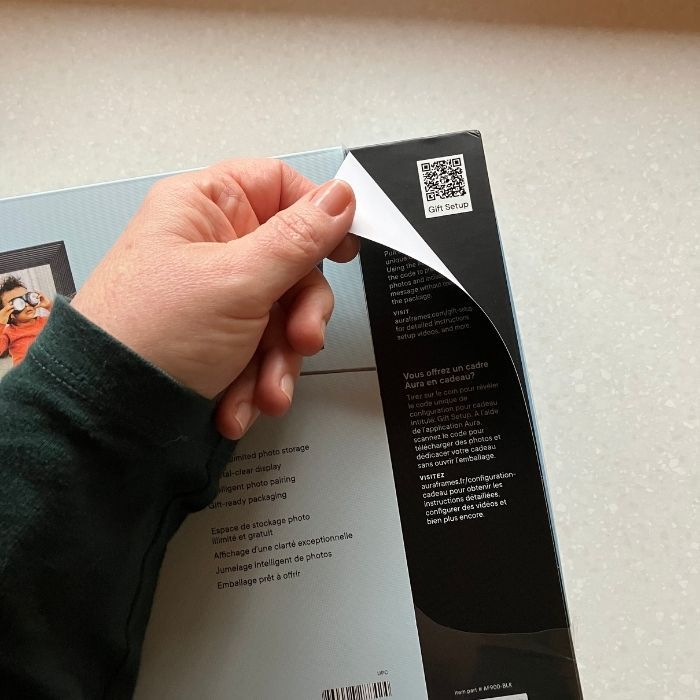
Gift-Giving Bonus
You can set up the frame as a gift without opening the box. Recipients just plug it in, connect to WiFi, and start seeing photos – perfect for surprising new grandparents or parents.
What Works Really Well
1. Display Quality That Surprised Me
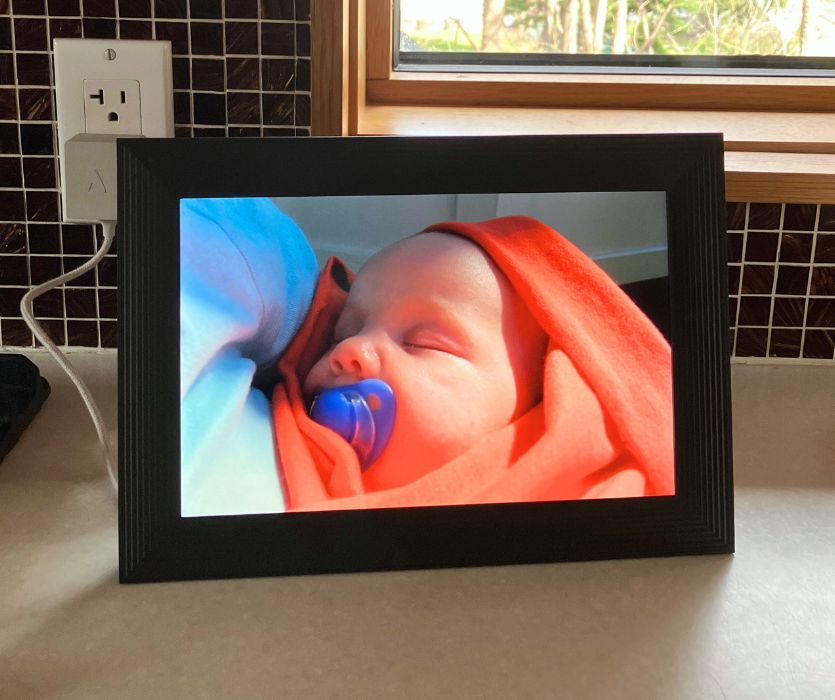
Even mediocre photos look beautiful on this frame. The bright display and high resolution elevate every image. I've seen snapshots taken in dim restaurant lighting look magazine-worthy.
The frame displays both portrait and landscape photos properly – no awkward cropping.
2. Actually Easy for All Ages
During my family test, everyone from my 16-year-old son to my 78-year-old father-in-law successfully uploaded photos. The interface is intuitive whether you're using an Android, iPhone, or tablet.
My in-laws (not tech-savvy) have been uploading photos independently for over a year with zero troubleshooting calls.
3. No Subscription Fees
This was non-negotiable for me. Unlimited storage, unlimited photos, unlimited invited users – all included with the purchase price. In an era of subscription creep, this is refreshing.
4. Touch Controls Without Overthinking
A sensor strip on top lets you:
- Swipe to advance photos manually
- Tap to control video sound
- No complicated button combinations to remember
The frame auto-rotates through photos in slideshow mode, but you can take control anytime.
5. Social Features That Actually Connect People
Everyone invited to the frame can:
- See all uploaded photos
- Like and comment on images
- Upload their own content
I love that I can see and like photos my nieces upload even though I don't have the frame. It creates a family connection beyond the physical device.
6. Ambient Light Sensor (Mostly)
The frame automatically adjusts brightness based on room lighting. This works well in normal lighting, though I noticed it works overtime in very sunny spots (more on that in drawbacks).
The Drawbacks to Know
1. WiFi Dependency
This frame requires constant WiFi to function. If you're considering this for someone without reliable internet or who doesn't trust WiFi, it won't work. The photos aren't stored on the frame itself – everything streams from Aura's cloud servers.
2. App-Centric Design
The best experience requires using the smartphone app. You can upload from a desktop, but it's clunkier. If your gift recipient uses a flip phone or strongly prefers computer-based photo management, this might frustrate them.
3. Price Point
At $150-$200 depending on size and sales, this isn't an impulse purchase for most families. The quality justifies the cost in my experience, but it's a considered investment, not a "let's try it and see" item.
4. Sunny Spot Concerns
When I placed the frame in direct sunlight, the ambient sensor constantly adjusted brightness. I can't confirm this affects longevity, but it made me nervous watching the frame work so hard. I moved it to a spot with indirect light.
5. Potentially Awkward Family Dynamics
Here's a real scenario: If Aunt Jen uploads 200 photos of her crusty-eyed dog and family members hide or delete them, the app shows who did it. This could create tension – or be gloriously passive-aggressive, depending on your family.
Common Questions Answered
Do You Need a Subscription?
No. Zero monthly fees, no hidden costs. The frame purchase includes unlimited storage, unlimited photos, and unlimited invited users forever.
The Aura app is free to download. I've been using this frame since 2024 with no additional charges.
How Secure Is It?
Photos are stored on Aura's cloud servers, accessible only to people you specifically invite. You control who has access and can remove users anytime.
Could Aura's servers be hacked? Theoretically yes, but:
- No credit card or financial data is stored
- Photos aren't tied to your broader digital identity
- The incentive for hackers is minimal
I personally trust this more than posting photos to Facebook, Instagram, or Google Photos, though your comfort level may vary.
Power Usage: Will This Spike Your Electric Bill?
The Aura frame uses:
- 10 watts when active (similar to a clock radio)
- 2 watts when sleeping
For perspective, an aquarium pump uses 20 watts. This won't meaningfully affect your electric bill – we're talking maybe $2-3 per year of electricity at typical rates.
Storage Capacity
Unlimited photos. Nothing is stored on the physical frame – everything is cloud-based over WiFi. This means:
- No running out of space
- If the frame breaks or is stolen, your photos are safe
- You can swap frames without losing your photo library
Customer Service Experience
I needed to change my display name (I share a name with another family member). Aura's website stated 2-3 day response times.
They responded in 24 hours with clear instructions. For a free support service, I was impressed.
The solution, for anyone else needing this: You change it by changing your profile name vs. changing it in the members section. Also, I can change my name to "Favorite Daughter" but I can't change my family member's name to "Dummy".)
Creative Ways to Use It
Beyond the obvious grandparent gift:
Wedding or Baby Shower Gift
Have guests download the app at the event and upload photos in real-time. The couple gets a curated collection of everyone's perspectives from their special day.
Kids' Artwork Gallery
Photograph your children's art and upload it to the frame instead of storing 8,000 hand-print paintings. Kids love seeing their work "displayed," parents reclaim closet space.
Long-Distance Messages
Send daily photos of your kids holding signs: "Happy Birthday, Grandma!" or "I lost my first tooth!" More personal than a text, easier than printing and mailing.
Pregnancy Announcement
Pre-load the frame with an ultrasound photo or announcement before gifting. The recipient opens the gift and immediately sees the news – much more memorable than a card.
Archived Family History
Scan old family photos tucked in boxes and albums, then gift the pre-loaded frame. This works beautifully for elderly relatives who have photos but can't easily view them.
College Send-Off
Give one to your college-bound kid so they can stay visually connected to home (and so you can see evidence they're eating vegetables).
Final Verdict
Who Should Buy This
- Families separated by distance who want effortless photo sharing
- Grandparents who want to see grandchildren without navigating photo-sharing apps
- New parents receiving it as a gift from extended family
- Anyone who loves photos but hates the friction of printing, framing, and updating displays
- Busy families who want memories front and center without the work
Who Should Skip It
- Anyone without reliable WiFi
- People uncomfortable with cloud storage
- Families where most members use flip phones
- Budget-conscious buyers looking for a "try it and see" purchase under $50
My Honest Take After 2+ Years
I initially tested this as a gift idea for grandparents. After living with it, I see much broader applications. It's genuinely kept our geographically scattered family more connected – seeing daily moments from nieces and nephews creates relationship continuity that group texts don't achieve.
The price gave me pause initially. After a year of use with zero issues, zero subscription fees, and regular family engagement, I consider it money well spent. It's not cheap, but it's also not a gadget collecting dust in a drawer.
Would I buy it again? Yes.
Would I gift it? Absolutely – and I have, twice now.
The Aura frame succeeds because it removes friction from something people already want: keeping loved ones' photos visible and current. For families who will use it, it's worth every dollar.
Where to Buy
Aura frames are available at:
Look for sales around holidays – I've seen $30-50 discounts during Black Friday, Mother's Day, and Father's Day.
Related Content You Might Like
About the Author
Amy Morrison is a mom of two boys who has been writing about pregnancy and parenting since 2010. She specializes in honest, tested product reviews and parenting advice without the sanctimommy nonsense. She lives in Toronto with her family and has never met a subscription fee she didn't resent.
Disclosure: This review is based on a frame I purchased. This post may contain affiliate links, which means I may earn a small commission if you purchase through them, at no cost to you. I only recommend products I genuinely use and believe in.


Leave a Comment